Support Links are one off coupon links do NOT require the user to verify a phone # and thus are a great solution if a consumer does not have the ability to receive a text message.
A unique ID is generated and attached to the specific link. Support links can be found inside the corresponding distribution link for the selected coupon.
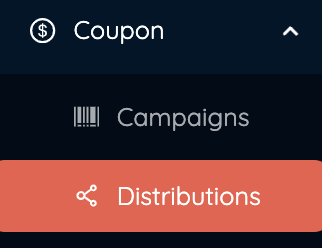
1. Click on Distributions
2. Click on the Action tab for the correct coupon distribution and select generate support link. 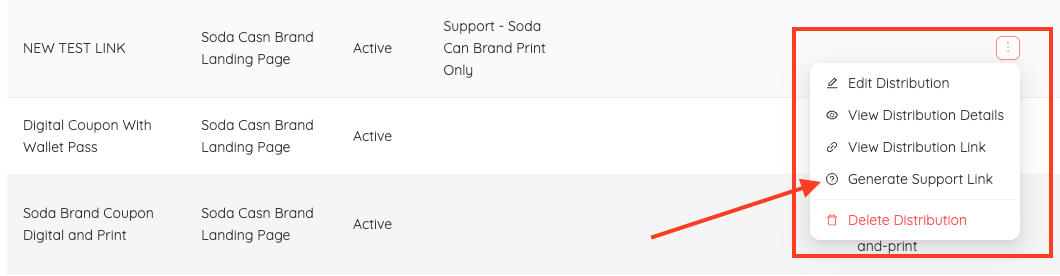
3. If this is the first support link created for this distribution link you will need to select the correct support group or the system can create a new support group for you. It is recommended to create a support group once and then re-use it for all additional support distributions you need in the future.
If there is already a support group created you can use the drop down to select one.
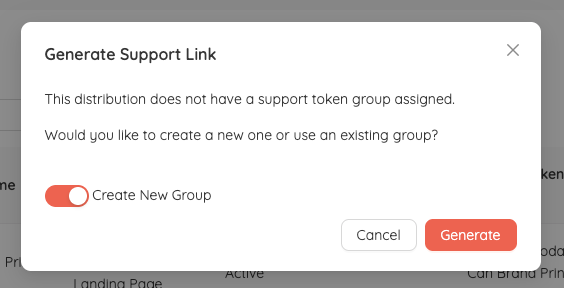
4. Generate your support link - By selecting generate a new serialized token is created and added to your support link.
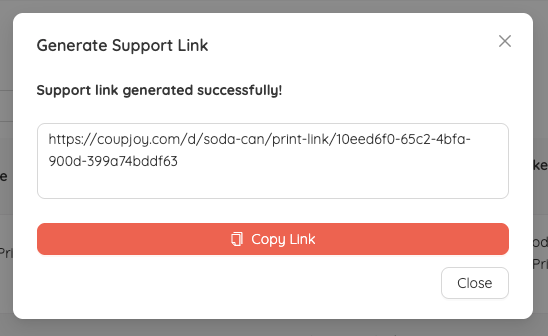
NOTE: Each support link can be used the same number of times that you allow each consumer to print. For eample if your coupon is set to allow 2 prints per user, the support link can be used twice
Was this article helpful?
That’s Great!
Thank you for your feedback
Sorry! We couldn't be helpful
Thank you for your feedback
Feedback sent
We appreciate your effort and will try to fix the article