Adding notifcations to your account is a great way to stay informed of what is going on with your coupons even if you are not logged into your CoupJoy Account. Follow the steps below to setup notifications for your account.
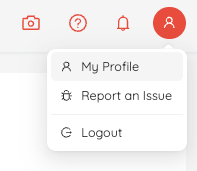
Click on "My Profile" in the top right drop down menu.
Click On Notifications
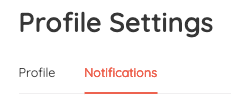
Activate Notifications and choose your preferences
Click the toggle to enable notifications for each category you want to receive notifications for.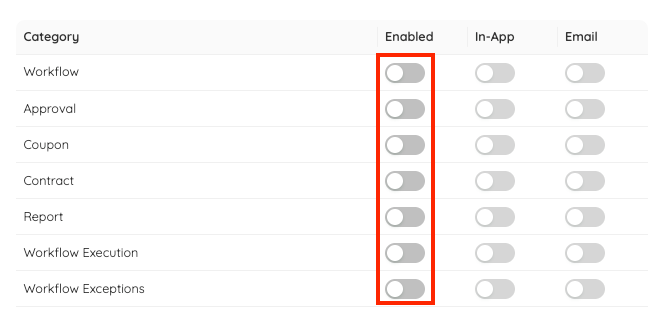
In-App Vs Email
There are two types of notifications for each group.In-App - Built for while you are using CoupJoy, these notifications will show up inside your CoupJoy account in the top right corner.
Email - Perfect for keeping informed when you are on the go. CoupJoy will send you an email notification.
Notifications Categories -
Workflow - Advanced notifications with more info coming soon.
Approval - Advanced notifications with more info coming soon.
Coupon - Provide updates to your current coupon(s). Ex.. Campaign expires soon, coupon as reached 50% or 100% of the total coupons left.
Contract - Provide updates to your current contract(s). Ex.. Campaign expires soon, coupon as reached 50% or 100% of the total coupons left.
Report - Provides notifications as reports are generated
Workflow Execution - Advanced notifications with more info coming soon.
Workflow Exceptions - Advanced notifications with more info coming soon.
Was this article helpful?
That’s Great!
Thank you for your feedback
Sorry! We couldn't be helpful
Thank you for your feedback
Feedback sent
We appreciate your effort and will try to fix the article